Meowdoku rules: a home for every cat
Meowdoku is a cat-placement logic puzzle. Solve the board by placing exactly one cat in every row, every column and every coloured region. Cats must never touch, even at a corner. An X is simply a note that a square cannot hold a cat.
One per region
Every coloured area needs exactly one cat, however large or oddly shaped it looks.
One per row & column
A cat rules out the rest of its horizontal row and vertical column.
Room between cats
Two cats cannot occupy neighbouring squares, including diagonal neighbours.
A diagonal is not a whole line to clear. Only immediately touching diagonals are forbidden. Cats farther apart on the same diagonal are allowed.
On a 4×4 puzzle you need four cats in total; on a 7×7 puzzle you need seven. Each placement must satisfy all the rules together. A square that looks clear in its row may still touch a cat or belong to an already-filled region.
How to play Meowdoku
The opening Journey levels use small boards and starter cats to help you learn. Those starter cats stay in place, giving you clues before you make your first move.
- Read the whole board. Look at the coloured regions and any cats already placed. Small regions often give you the simplest starting point.
- Rule out impossible squares. Tap or click once to mark an X. Cross out a cat’s row, column, region and touching diagonals. Automatic X marks can do these exclusions for you.
- Find a forced home. If a row, column or region has only one possible square left, its cat must go there. Double-tap or double-click that square.
- Check what changed. A new cat affects several parts of the board. Look again for a single remaining candidate before trying a more involved deduction.
- Finish every region. Find all the cats to complete the board and unlock the next Journey level. A wrong placement costs a heart, so use crosses to test your reasoning first.
Mouse, touch and keyboard controls
| Action | Mouse or touchscreen |
|---|---|
| Mark or erase a manual X | Click or tap a square once. |
| Place a cat | Double-click or double-tap the same square. |
| Mark several squares | Hold and drag. Start on a manual X to erase notes instead. |
| Undo a move | Use the curved arrow. A whole drag stroke counts as one move. |
With a board square focused, use the arrow keys to move, X to mark, C to place or remove a cat, and Backspace to clear a note or movable cat. Use Z to undo and H for a cross hint. Fixed starter cats and red mistake crosses cannot be erased.
Automatic Xs stay visible while a cat rules out that square. Settings lets you switch automatic Xs and drag marking independently, show region letters, mute sound or replay the tutorial.
Meowdoku tips: look for certainty
Start with exclusions rather than a guess. The useful question is “where can this cat still go?” Revisit that question for each region, row and column after every placement.
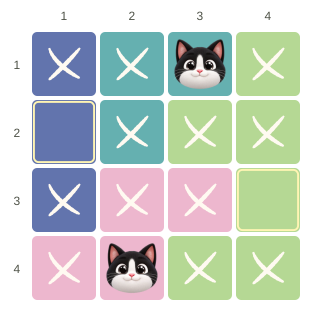
Try it on the first puzzle
The starter cats sit at row 1, column 3 and row 4, column 2. Those rows, columns and coloured regions are already taken.
Now check row 2: columns 2 and 4 touch the top cat diagonally, and column 3 is occupied. That leaves row 2, column 1.
In row 3, columns 1 and 3 touch the bottom cat, while column 2 is taken. The last cat belongs at row 3, column 4. No guess needed.
- Start with the smallest remaining region. Count its available squares after exclusions, rather than judging by the size of the coloured area.
- Use a region confined to one line. If every possible home in a region lies in the same row, that row’s cat must be in that region. Cross out the row outside it. The same logic works for a column.
- Save rows for the regions that need them. If two unfilled regions can only use the same two rows, those rows are reserved for them. Other regions must place their cats elsewhere.
- Check your own notes when stuck. A manual X records your decision. If a region seems to have no space left, review those notes and the touching diagonals before spending help.
Is Meowdoku like Sudoku, Queens or Star Battle?
“Cat Sudoku” is a useful nickname, but Meowdoku has no numbers or 3×3 Sudoku boxes. Its one-per-row, column and region rules are closer to Queens and the one-star form of Star Battle. Some Star Battle puzzles require two stars in each line and region; this game always asks for one cat.
Journey levels and a daily logic puzzle
Your Journey
Work through 54 ordered levels, beginning with a 4×4 board and two fixed cats. Puzzles gradually grow through 5×5 and 6×6 to 7×7, introducing larger boards with a starter cat before taking that help away.
Complete a level to unlock the next. After level 54, advanced 7×7 variations continue. Your Journey progress stays saved when you switch to Daily.
The Daily puzzle
Try a 6×6 challenge selected for your device’s local calendar date. The same date and game version select the same board and orientation; layouts can appear again on later dates.
Open the puzzle menu (the four-tile icon at the top left of the game), choose Daily puzzle, and start the challenge. Return to Journey whenever you like.
Both modes use the same placement rules. The timer records your solving time; there is no countdown deadline. Personal results are saved on your device, with no shared online leaderboard.
Hints, hearts and your score
The bulb and cat buttons offer different kinds of help. Choose a cross hint if you want to keep making the placements yourself, or reveal a cat to move the board forward.
- Bulb: cross hints
- Adds up to three correct X marks. Each round has five cross hints, and one is spent only when it adds a mark.
- Cat: reveal a home
- Places one correct cat. You begin with five cat helps in a saved balance shared across Journey and Daily. Restarting does not refill it. At zero, there is no refill option in the browser game; you can keep playing with cross hints and your own deductions.
- Hearts: three chances
- A wrong cat placement costs one life and leaves a red cross. That cross and the lost heart stay after Undo; a fresh round clears them.
Undo restores ordinary board edits, but never refunds a hint or cat help. Once a round has ended, use the offered restart or next-level control to continue.
Score starts with 100 points per cat found, minus 25 per mistake, cross hint or cat help, with a minimum of zero. Starter cats award no points. Removing a cat also removes its placement points. For example, a board with four cats to find gives 400 points without help or mistakes, or 375 after one cross hint. Compare like-for-like boards: larger puzzles offer more placement points.
Meowdoku app download for Android and iPhone
Want the full Meowdoku game on your phone? Download the Meowdoku app from the App Store for iPhone and iPad, or get it on Google Play for Android. Choose your platform to open the game’s store page.
Meowdoku for iOS
 View on the App Store
Android phones & tablets
View on the App Store
Android phones & tablets
Meowdoku for Android
 View on Google Play
Check your device’s store for availability and system requirements. Prefer to play straight away? Play Meowdoku online without installing anything.
Questions about playing Meowdoku online
Is Meowdoku free, and do I need to download it?
The game at Meowdoku.uk is free to play in your browser. You do not need an account, subscription or app download. Use a modern browser on a phone, tablet or computer, with JavaScript enabled.
Can cats be on the same diagonal?
Yes, if they do not touch. Cats in immediately neighbouring diagonal squares are forbidden. Cats farther apart on a diagonal are allowed, provided they also obey the row, column and region rules.
Can I play Meowdoku offline?
Load the game while connected first. Once Settings shows Offline ready, the cached game can reopen without a connection in a browser that supports offline storage. Clearing site data removes that cache. An internet connection is needed for the initial load.
Why did I lose a heart when the square looked possible?
A cat has to belong to the puzzle’s complete solution, not just avoid the cats you have placed so far. An apparently open square may leave another region with no valid home. Use X marks and deductions to establish a placement before committing.
Does my progress save when I leave?
Yes, when browser storage is available. Journey progress, current puzzles, notes, preferences and remaining cat helps are saved in this browser on this device. They do not sync between devices. Private browsing or clearing site data can remove your save.
Does every puzzle have a solution?
Every board in this browser version’s puzzle banks is checked to have one solution. Your own X marks can still rule out a correct square, so review manual notes if a row, column or region appears impossible.
Where can I download the Meowdoku app?
Use the Meowdoku app download cards above for Google Play and the App Store. Android players can choose Google Play; iPhone and iPad players can choose the App Store.

One good deduction leads to the next.
Pick a region, find its last possible square, and give another cat a home.